mobile-canvas is published by Jonathan Dick from Redth/mobile-canvas-ghcp, pinned to c930769d41f07852baeeb407ded76d5ba83c06d2. Review the source before installing.
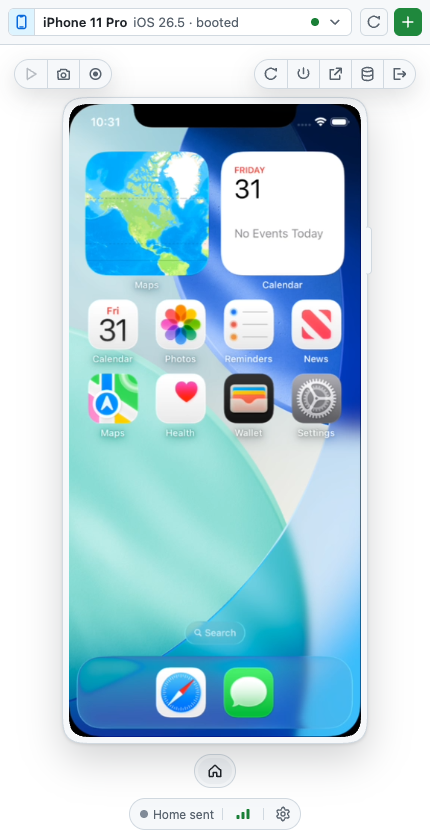
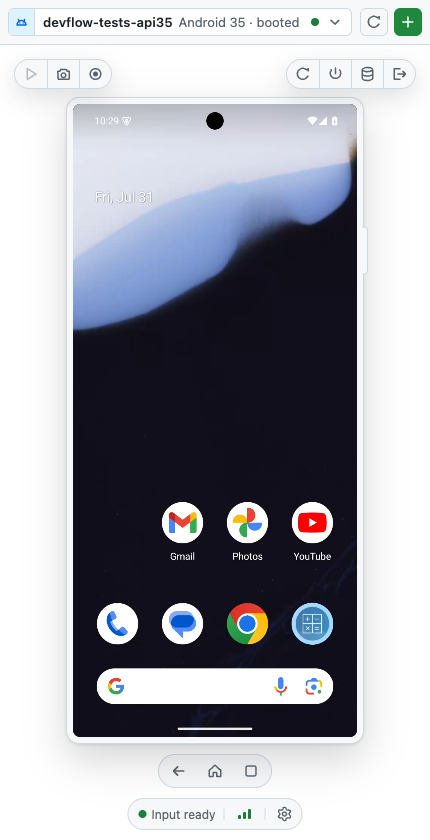
View, create, boot, and interact with local iOS Simulators and Android emulators from inside a GitHub Copilot canvas — and give your agent the same controls through MCP.
 |
 |
https://github.com/user-attachments/assets/bedf866a-331b-463d-971e-b3aae82019ed
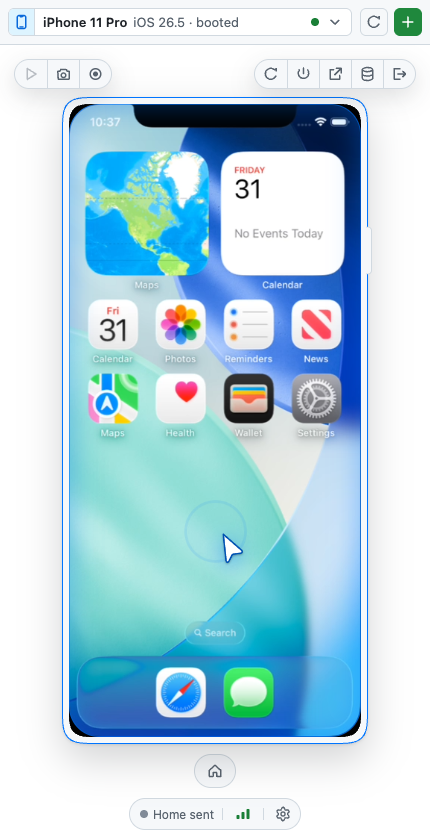
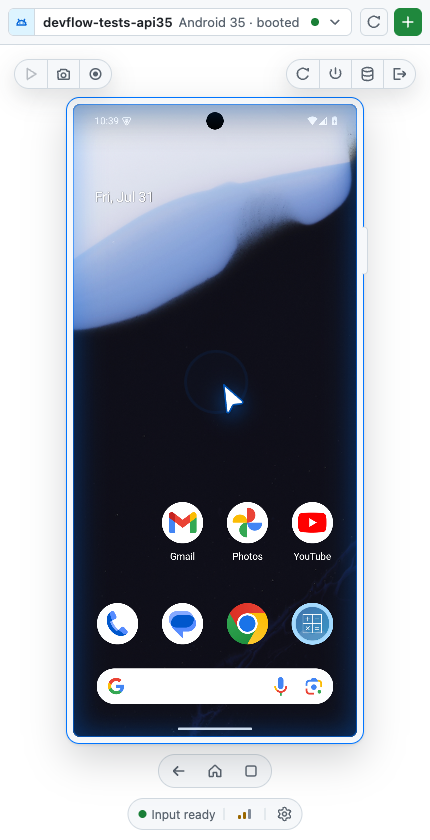
Live H.264 video at ~58 FPS (iOS) and ~50 FPS (Android), with real tap, drag, scroll, and keyboard input. Everything runs locally on loopback; nothing is uploaded anywhere.
Getting started
Install it from inside the GitHub Copilot app. The plugin ships the executable itself, so there is no build step, no download, and no Apple developer certificate.
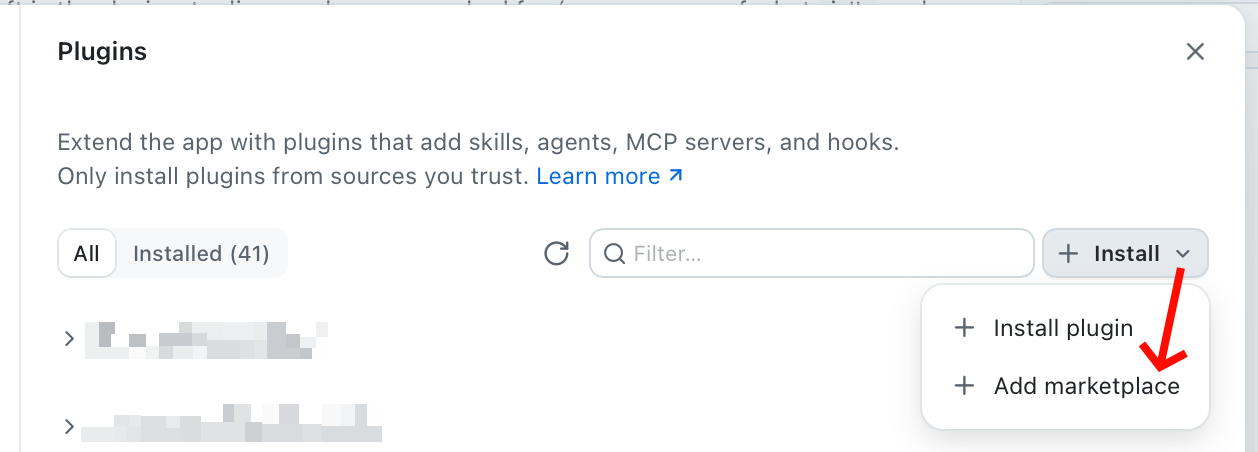
1. Open Plugins, then Install ▸ Add marketplace.
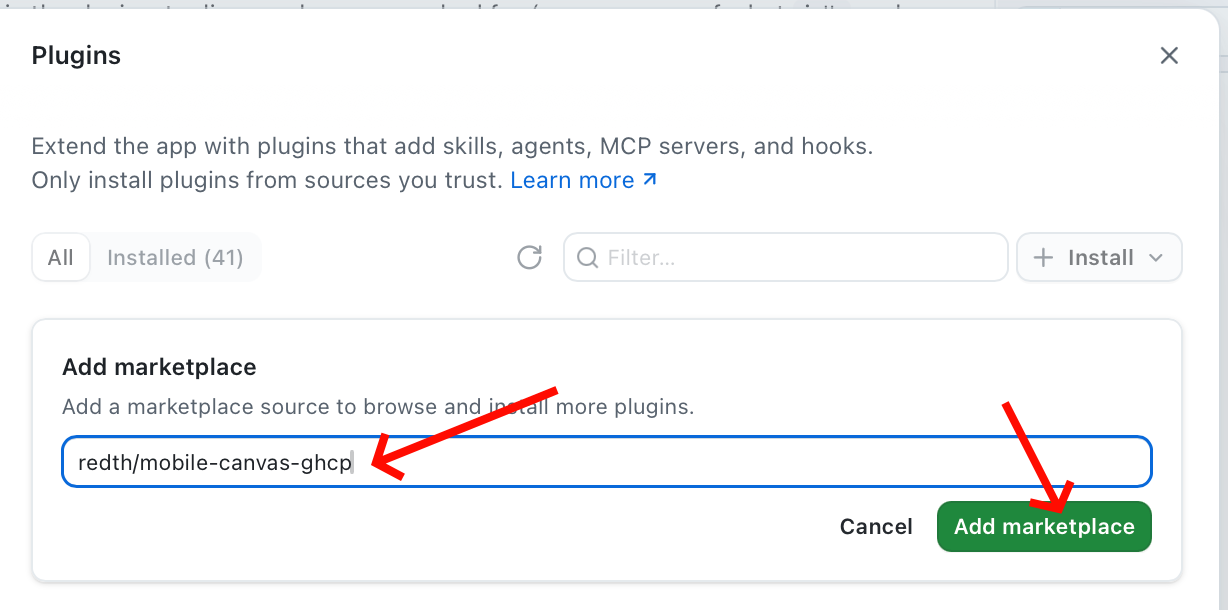
2. Enter Redth/mobile-canvas-ghcp and click Add marketplace.
3. Find mobile-canvas in the list and click Install.
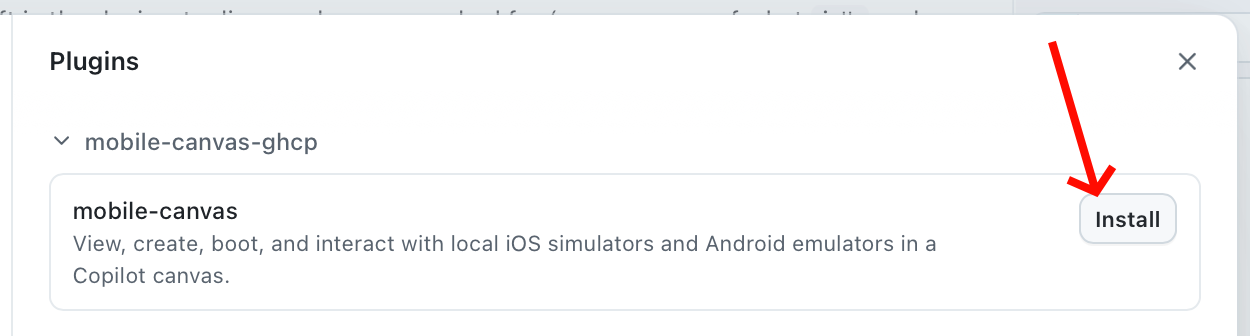
That registers the canvas extension and the MCP server together. Reload Copilot, then ask it to open the Mobile Device canvas — or pick it from the canvas menu — and select a booted simulator or emulator.
Prefer the keyboard? The same two steps:
/plugin marketplace add Redth/mobile-canvas-ghcp
/plugin install mobile-canvas
You still need Xcode for iOS or the Android SDK for Android; see Requirements. For how a plugin install ships a native binary, see How the executable ships.
What it does
Device management
- Discover installed runtimes/system images, device types, and existing devices.
- Create, boot, wait, restart, shut down, reveal, erase, and delete.
- Erase and delete always require an explicit confirmation.
Live interaction
- Live Annex-B H.264 decoded with WebCodecs, with automatic PNG polling whenever the stream is unavailable.
- Tap, long press, drag, swipe, wheel scroll, text, keys, and device buttons, mapped correctly at every view scale and orientation.
- PNG screenshots and bounded video recordings written to disk.
Agent control
- 24 MCP tools mirroring the 24 canvas actions one-to-one.
- Every target-changing call returns the full device record, including the
udid/serial you need to hand to a deploy command. - When an agent drives the device, the canvas shows an accent-coloured glow and an animated cursor so a human watching can tell automation from their own input.
 |
 |
Requirements
| Requirement | |
|---|---|
| iOS | macOS, Xcode with Simulator runtimes, and idb_companion (brew install facebook/fb/idb-companion) for input |
| Android | Android SDK with emulator, avdmanager, and adb on PATH |
| Both | Screen Recording and Accessibility permission (iOS video only) |
Android emulators must be started with -gpu host. A software-rendered AVD
drops video from ~50 FPS to ~3 FPS.
| Platform | iOS Simulator | Android emulator | Video |
|---|---|---|---|
| macOS | yes | yes | H.264 |
| Windows | no | yes | screenshot polling |
| Linux | no | yes | screenshot polling |
iOS control requires simctl and idb, so it is macOS-only. Android works
everywhere; hardware H.264 encoding currently runs through a macOS helper, so
elsewhere the canvas falls back to screenshot polling.
Other ways to install
From source
git clone https://github.com/Redth/mobile-canvas-ghcp
cd mobile-canvas-ghcp
./scripts/build.sh      # Native AOT binary + universal Swift capture helper
./scripts/install.sh    # Installs into ~/.copilot/extensions/mobile-canvas
Reload Copilot afterwards so it picks up the extension. Source installs register
as Mobile Device (Local) (mobile-device-local), so a development build can
coexist with the marketplace plugin without registering the same canvas ID twice.
As a .NET global tool
For a plain CLI/MCP install without the canvas:
dotnet tool install -g MobileCanvas.Tool
Usage
Ask Copilot to open the Mobile Device canvas, or open it from the canvas picker. Select a running device, or create one from an installed runtime.
From the CLI:
mobile-canvas devices list --json
mobile-canvas devices boot <id> --wait
mobile-canvas input tap <id> --x 100 --y 200
mobile-canvas screenshot <id> --output shot.png
mobile-canvas host status
mobile-canvas guide
Every query command accepts --json and --schema, so output composes safely
with jq.
Agent tools
All 24 tools are available both as canvas actions and as MCP tools named
mobile_device_*:
| Group | Tools |
|---|---|
| Discovery | list, get, catalog, select, get_selected, display |
| Lifecycle | create, boot, shutdown, restart, reveal, erase, delete |
| Input | tap, long_press, swipe, type_text, press_key, press_button, rotate |
| Media | screenshot, recording_start, recording_stop, recording_status |
A typical agent flow is list → select → read udid from the result → deploy
your app to that exact device → drive it with the input tools.
VS Code
The same MCP server works in VS Code's Copilot Chat with no extra code. See
docs/vscode.md, or copy .vscode/mcp.json
into your project.
The canvas and MCP can run at the same time: MCP is a thin client of the shared background host rather than a second copy of it.
Architecture
GitHub Copilot app                    VS Code / CLI / agent
  └─ extension.mjs                      └─ mobile-canvas mcp (stdio)
       │ canvas actions                      │ 24 tools
       └──────────────┬───────────────────────┘
                      ▼
              mobile-canvas host          (per-user singleton, loopback only)
                ├─ HTTP + WebSocket for the canvas UI
                ├─ per-canvas selected-device state
                └─ platform backends
                     ├─ iOS      simctl + ScreenCaptureKit + idb (input)
                     └─ Android  emulator gRPC (video + input) + adb
The host is started on demand, binds only to 127.0.0.1, and authenticates
canvas panels with a single-use bootstrap secret exchanged for a session cookie.
It exits after an idle grace period and never shuts down a device
implicitly, so detaching a panel is always safe.
Video is deliberately split from input on both platforms:
| Concern | iOS | Android |
|---|---|---|
| Frames | ScreenCaptureKit window capture | emulator gRPC streamScreenshot |
| Encode | VideoToolbox H.264 | same VideoToolbox H.264 |
| Input | idb (Indigo HID) | emulator gRPC streamInputEvent |
| Lifecycle | simctl |
emulator/avdmanager + gRPC |
Raw Android frames are encoded before they reach the browser, so only ~1-2 Mbps crosses to the canvas instead of the 41-577 MiB/s the emulator emits.
Development
dotnet build MobileCanvas.slnx
dotnet test  tests/MobileCanvas.Tests/MobileCanvas.Tests.csproj
./scripts/build.sh          # builds one architecture into .build/bin/<rid>
./scripts/release.sh        # rebuilds every shipped arch and refreshes runtimes/
Two things to know before you change anything:
- Web assets are embedded resources. Any change to
web/needs a republish, not a file copy.extension.mjsis the opposite — it is copied directly and is not part of the binary. dotnet publishdoes not build the Swift helper.scripts/build.shbuilds both. A stale helper fails only later, at stream start; check it withmobile-screencap --helpand confirm anencodesubcommand exists.
Changing src/ or native/ also means re-running scripts/release.sh and
committing runtimes/, because that bundle is what a plugin install actually
executes. See How the executable ships.
License
MIT. See LICENSE.